What is auto parts billing software?
Auto parts billing software creates GST bills, finds a part by its number or by the vehicle it fits, and keeps stock across thousands of items and brands. The useful ones also give mechanics their own prices and keep garage accounts.
Built for part numbers, vehicles and mechanics
Everything below is in BillSakha now. Features marked not on every plan depend on your plan; the plan comparison shows which.
Vehicle details on each part
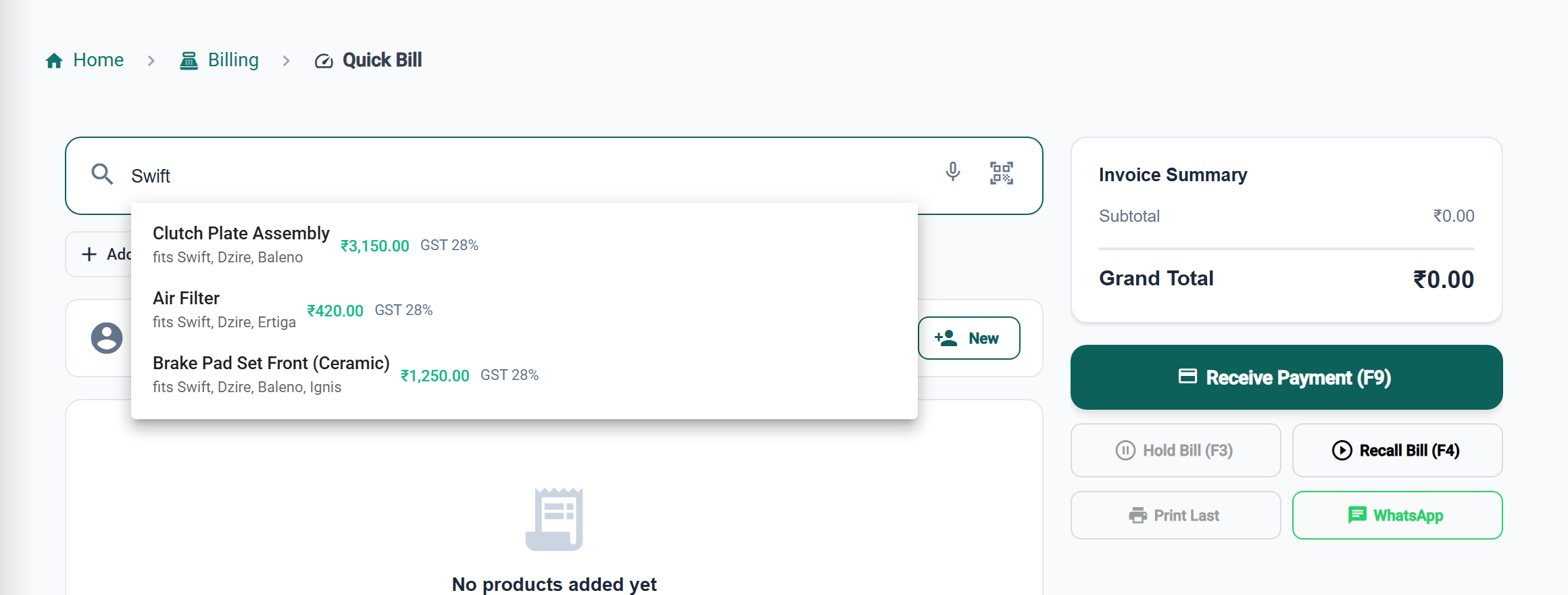
Vehicle type, engine type, fuel type and which models a part fits, recorded on the product; search finds a part by the vehicle it fits.
Brands and categories
Organise parts by brand and category; find them by name, part number (SKU) or barcode.
Mechanic and garage accounts
Bill mechanics on credit and record payments; credit limits, payment terms and the aging report are there for larger accounts.
not on every planSuppliers and purchases
Purchase orders, goods received, purchase bills and returns to the supplier.
not on every planQuotations
Quote a garage for a set of parts and convert it to an invoice.
Mechanic prices
Put mechanics on a "Mechanic" price level (a percent off, or a price per part) and their bills use it; retail customers pay the normal price.
Batteries by serial number
Track batteries and other warranty parts by serial number: the bill names the serial, and a battery brought back shows its sale and whether it is still under warranty.
Low-stock alerts
Know before a fast-moving part runs out.
GST and HSN
HSN code and GST rate per part, and the GST reports at month end.
Other brands' part numbers
Add a product field for the same part's numbers from other brands; searching any of them in Quick Bill or an invoice finds the part.
not on every planSee it on screen
The right part, found fast
Search by vehicle
Find a part by the models it fits, its part number or barcode.
Other brands' numbers too
Save the same part's numbers from other brands and search by any of them.
Mechanic prices by themselves
Mechanics on a price level get their rate on every bill.
Warranty parts traced
Batteries by serial number, with the sale and warranty shown when one comes back.
BillSakha vs catalogues and registers
| Task | Catalogue and register | BillSakha |
|---|---|---|
| Which part fits a Swift | Flip through catalogues | Search "Swift" and see the parts that fit |
| A mechanic's rate | Remembered or on a card | Their price level applies by itself |
| A battery back under warranty | Find the old bill | Scan the serial; see the sale and cover |
| What a garage owes | A credit register | Customer ledger with every bill and payment |
Is BillSakha right for your shop?
Best for
- Auto parts shops with thousands of parts across brands
- Shops supplying mechanics and garages on credit
- Shops selling batteries and other parts with warranty
Check before you decide
- Credit control, purchases and custom fields depend on your plan, so check the plan comparison.
How to search by other brands' part numbers in BillSakha
- Go to Settings → Custom Fields and add a product field such as "Other part numbers".
- Fill it in on each part with the matching numbers from other brands.
- Search any of those numbers in Quick Bill or an invoice, and the part comes up.
How-to guides
Step-by-step help for the things this kind of shop does every day.
- IMEI and serial numbersSell each phone or appliance by its IMEI or serial, and find who bought it.
- Wholesale and contractor price levelsGive groups of customers their own prices, used automatically on their bills.
- Your own fields (custom fields)Add fields of your own to products, customers and invoices: measurements, doctor, other part numbers.
- New GST rates 2025: what changes on your billsThe 12% and 28% GST slabs are gone. What the new 5%, 18% and 40% rates mean for a shop, old stock, bills across the change date, and your billing software.
Common questions
Can I find a part by its part number?
Yes, if you save the part number as the SKU or barcode.
Can I find a part by another brand's part number?
Yes. Add a product field such as "Other part numbers" under Settings → Custom Fields, fill it on the part, and searching any of those numbers finds it. Custom fields are not included in every plan.
Can I find parts by the car they fit?
Yes. Record the models a part fits on the product, and searching "Swift" in Quick Bill or an invoice finds it, showing "fits …" under the name.
Can I give mechanics a lower price?
Yes. Create a "Mechanic" price level and put mechanics on it; their bills use those prices automatically. Price levels are on every plan.
What is the best billing software for an auto parts shop?
One that finds parts by number or vehicle, gives mechanics their own prices, and keeps garage accounts. BillSakha does these. Start a free trial and bill a few real parts before you decide.
Can I try it before paying?
Yes. Start a free trial and bill a few real items before you decide.