Grocery and kirana store billing software
BillSakha is GST billing software for grocery and kirana stores in India. Bill packed items by barcode and loose items by weight, track batches and expiry dates, and keep customer credit (udhaar) accounts in one system.
Last updated: October 2026
What is grocery billing software?
Grocery billing software creates GST bills, tracks stock and records customer payments digitally. For a kirana store, the useful ones also handle loose items sold by weight, products with expiry dates, and regular customers who pay later. It replaces handwritten bills, calculators and credit notebooks with one connected record.
Built for how a grocery counter actually works
Everything below is in BillSakha now. Features marked not on every plan depend on your plan; the plan comparison shows which.
Loose items by weight
Sell 0.5 kg of dal or 250 g of spices: quantities in kg, g, L and ml can have decimals, and stock goes down by exactly that much. Units counted in pieces stay whole.
Weighing-scale labels
Scan the label your weighing scale prints, with the weight or the price inside the barcode, and Quick Bill adds the item with that weight.
By the bag or loose
Sell rice by the 25 kg bag or loose by the kg from one stock: switch the line on the bill between bag and kg, and a bag takes 25 kg out of stock. Order and receive it by the bag too.
Fast counter billing
Quick Bill takes barcode scans and keyboard shortcuts. Hold a bill when a customer steps away and recall it later.
Batches and expiry dates
Record a batch number and expiry date when stock comes in. Sales take the batch that expires first, and the expiry report shows what is running out of date.
Low-stock alerts
Set a minimum level per product and get told when stock drops below it, before the shelf is empty.
Customer accounts (udhaar)
Bill a regular customer on credit, record part payments, and see what each customer owes in their ledger.
Loyalty points
Customers earn points on purchases and redeem them on a later bill.
Bills on WhatsApp
Send the bill to the customer on WhatsApp instead of printing it.
GST done for you
HSN code and GST rate per product, the tax split on every bill, and GSTR-1 and GSTR-3B reports at month end.
Also included: separate logins for your staff (how many depends on the plan), use on your phone's browser, customer records, sales and stock reports, quotations, and payment tracking with reminders.
See it on screen
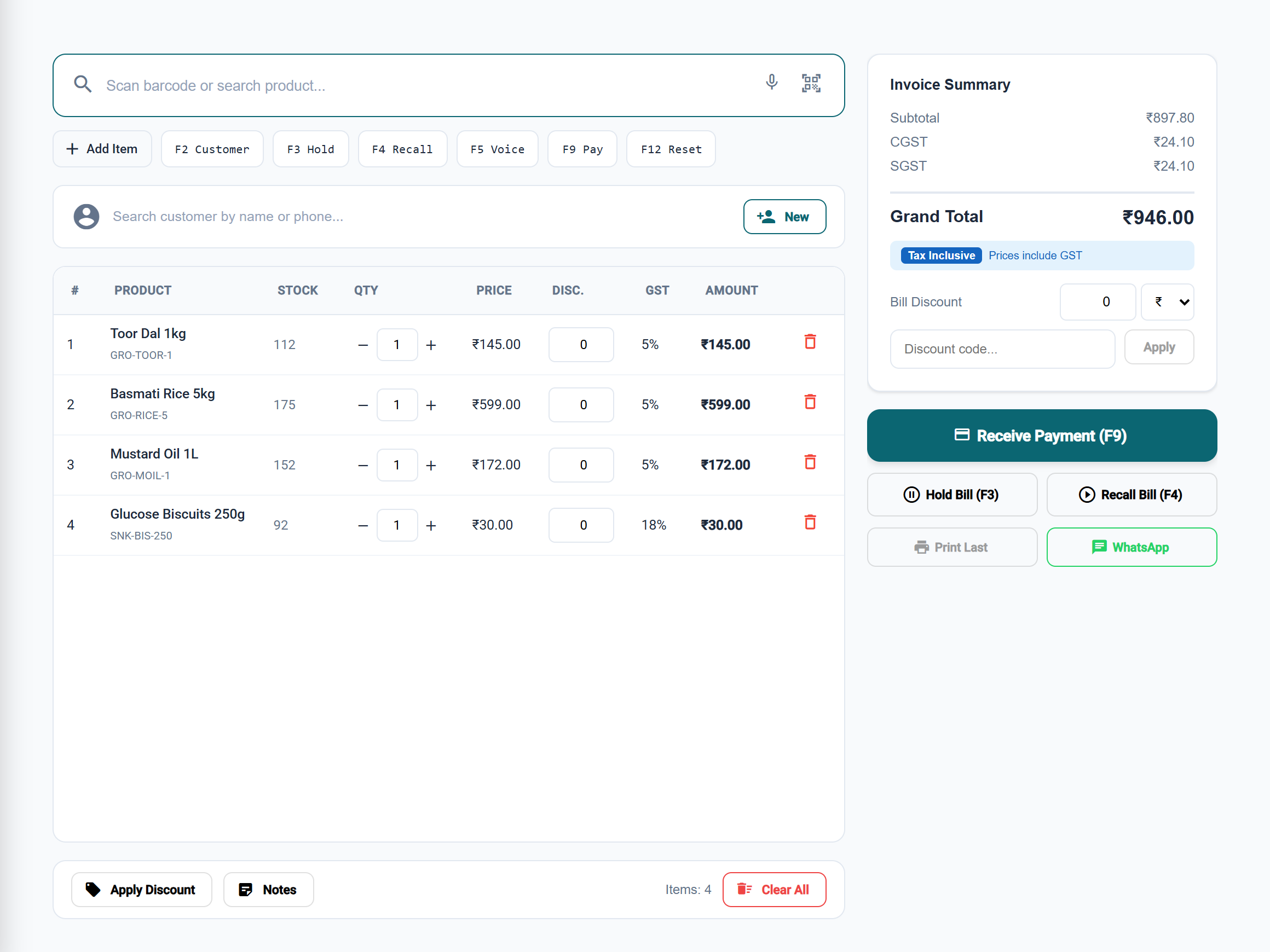
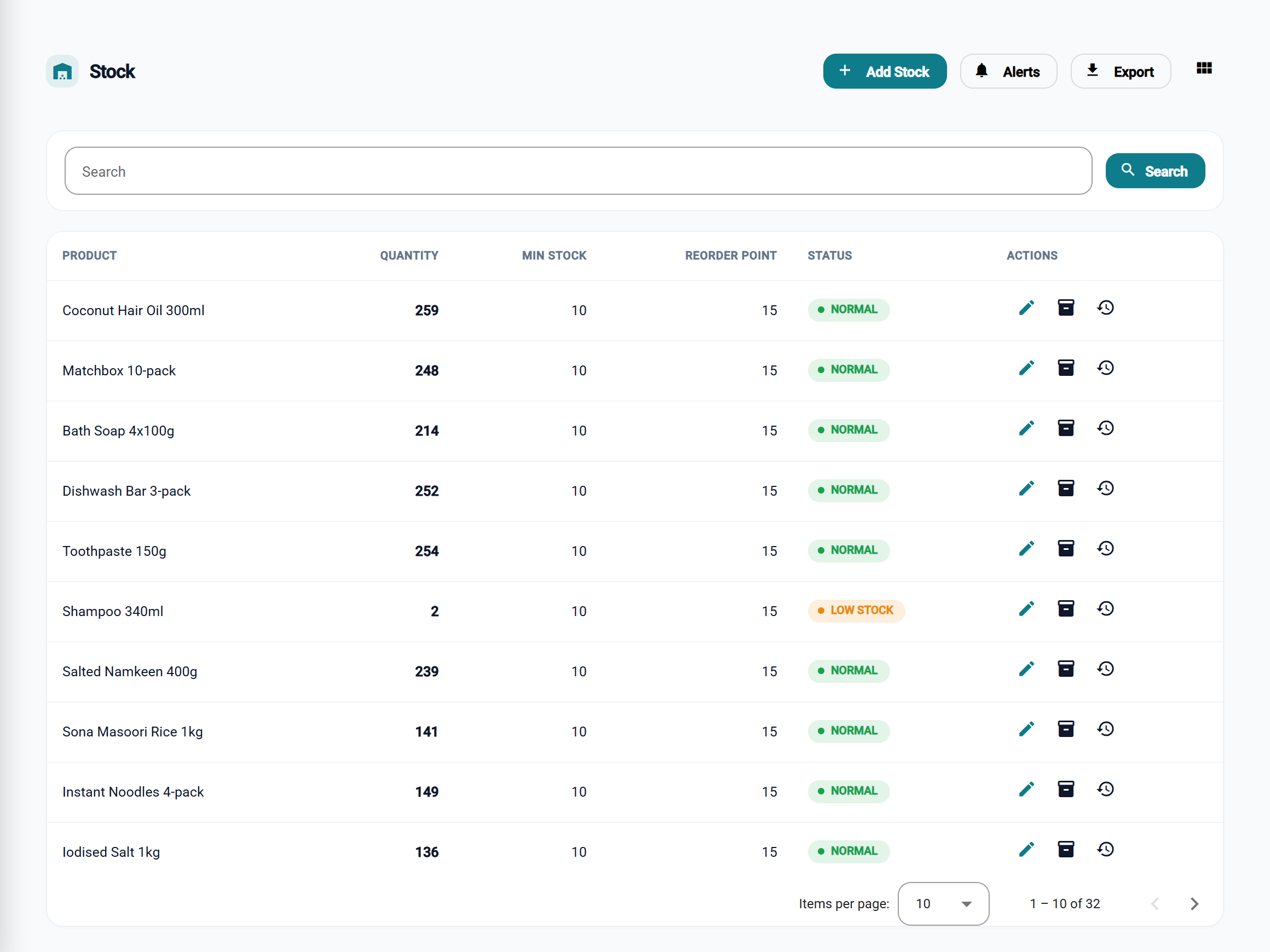
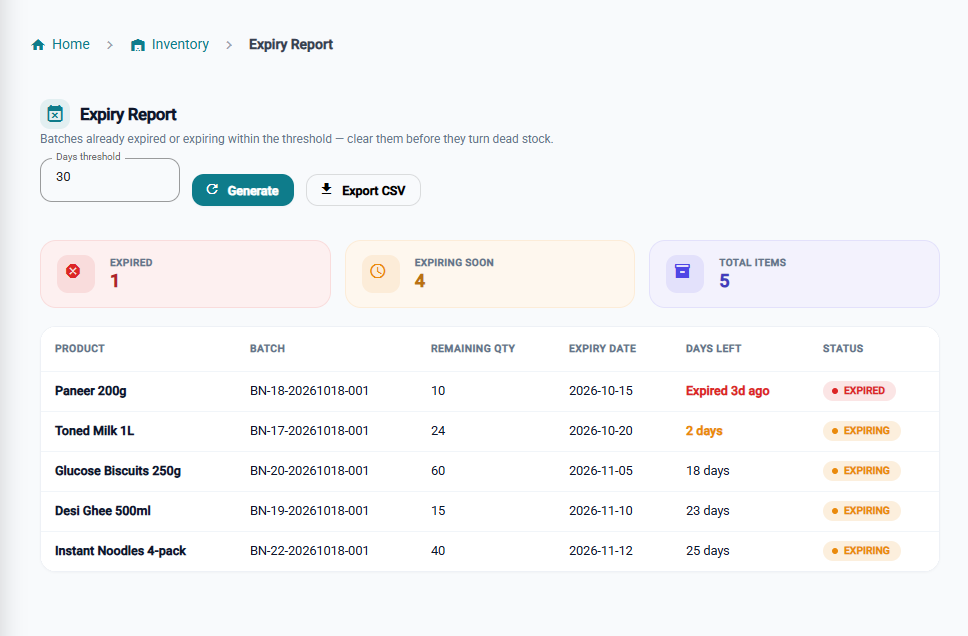
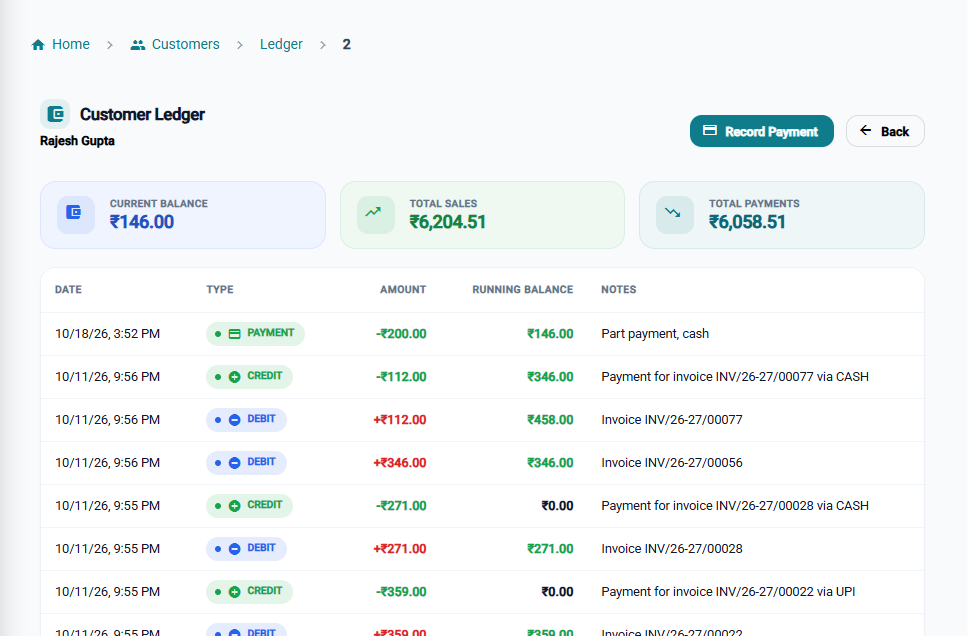
One system for packed goods, loose items and credit
One stock, two ways to sell
Loose and packed sales draw from the same stock, so your numbers stay right.
Less waste
Expiry-first selling and the expiry report help you move stock before it goes out of date.
Fewer missed reorders
Low-stock alerts warn you before a fast-moving item runs out.
Clear credit records
Every udhaar entry and part payment sits in the customer's ledger, not in a notebook.
Simpler GST
Tax is worked out on every bill, and your return reports are ready at month end.
BillSakha vs notebooks and spreadsheets
| Task | Notebook or spreadsheet | BillSakha |
|---|---|---|
| Selling 250 g of loose spices | Work out the price by hand, update stock by hand | Enter or scan the weight; stock goes down by itself |
| Tracking expiry | Checking shelves or notes | Expiry report, and sales take the batch that expires first |
| Customer credit (udhaar) | Entries spread across pages | A ledger per customer, with part payments |
| GST at month end | Totals added up by hand | GSTR-1 and GSTR-3B reports |
| Low stock | Noticed when the shelf is empty | An alert when stock drops below your minimum |
Is BillSakha right for your shop?
Best for
- Kirana and grocery stores that sell both packed and loose goods
- Shops with regular credit (udhaar) customers
- Stores that stock items with batch numbers and expiry dates
- Owners who want staff to bill while they keep track of stock and dues
Check before you decide
- Some features depend on your plan, so check the plan comparison.
- Weighing-scale labels need a few settings first (steps below).
How to scan weighing-scale labels in BillSakha
- Go to Settings → Printer Settings and turn on weighing-scale labels.
- Set how your scale lays out its labels: the prefix, the item code, and whether the label holds the weight or the price.
- For each loose product, enter the scale's item code as its barcode or SKU.
- Scan a label at the counter in Quick Bill. The product is added with its weight.
How-to guides
Step-by-step help for the things this kind of shop does every day.
- Bill a customer with Quick BillScan or search items, change quantities, take payment, and the keyboard shortcuts.
- Hold a bill and come back to itPark a bill while a customer fetches something, and serve the next customer meanwhile.
- Bill when the internet dropsKeep products, customers and bill numbers on each device, see what is waiting to send, and check offline bills.
- Sell by weight or length (0.5 kg, 2.5 m)Which units take decimal quantities, and how to allow fractions for your own units.
- Weighing-scale labelsScan the labels your weighing scale prints, with the weight or price inside the barcode.
- Batches and expiry datesRecord lots with batch numbers and expiry dates, and see what is about to expire.
- Add stock and get low-stock alertsStock Entry, minimum levels, and the Low Stock Alerts page.
- Customers who pay later (udhaar)Bill on credit, record part payments, and see what each customer owes.
- GST rates on kirana items: the 2026 listGST on everyday kirana items since 22 September 2025: milk and dairy, biscuits, namkeen, drinks, soap and shampoo, with the old and new rates side by side.
- New GST rates 2025: what changes on your billsThe 12% and 28% GST slabs are gone. What the new 5%, 18% and 40% rates mean for a shop, old stock, bills across the change date, and your billing software.
- Tax invoice or bill of supply: which to issue?When a shop issues a GST tax invoice, when a bill of supply, and when no bill is needed at all, with what each must show. Straight from the CGST Act and Rules.
Common questions
What is the best billing software for a kirana store?
One that handles loose items by weight, expiry dates, customer credit and GST in one place. BillSakha is built for these. Start a free trial and bill a few real items to see whether it fits your counter.
Can I scan the labels from my weighing scale?
Yes. Under Settings → Printer Settings, turn on weighing-scale labels and set how your scale lays them out (the prefix, the item code, and whether the label holds the weight or the price). Give each loose product the scale's item code as its barcode or SKU; scanning a label then adds that product with its weight.
Can I sell rice by the kg and soap by the piece on the same bill?
Yes. Each product has its own unit. Products in kg, g, L or ml accept decimal quantities like 0.5 or 2.25; products in pieces, packets or boxes accept whole numbers only.
Can I sell a bag of rice and also loose kg from it?
Yes. Keep rice in kg and give it a pack: a bag of 25 kg at its own price. On the bill, switch the line between bag and kg; stock is always counted in kg.
Does it know which stock expires first?
Yes, when you record batches with expiry dates. A sale takes stock from the batch that expires first, and the expiry report lists batches that are close to or past their date.
Can customers pay later?
Yes. Leave the bill unpaid or part-paid against the customer, record payments as they come, and the customer ledger shows the balance.
Does it handle GST for grocery items?
Yes. You set the HSN code and GST rate per product, each bill shows the tax split, and GSTR-1 and GSTR-3B reports are ready at month end. For tax advice for your business, ask your CA.
Can I try it before paying?
Yes. Start a free trial and bill a few real items before you decide.