What is cosmetics shop billing software?
Cosmetics shop billing software creates GST bills, keeps stock for every shade and size, and tracks batch numbers and expiry dates so old stock is sold or cleared in time. The useful ones also reward regular customers.
Built for shades, batches and regulars
Everything below is in BillSakha now. Features marked not on every plan depend on your plan; the plan comparison shows which.
Shades as variants
Each shade or size is a variant with its own colour swatch, SKU, barcode, price and stock.
Batches and expiry dates
Record batch and expiry when stock comes in; sales take the lot that expires first, and the expiry report shows what to clear.
Beauty product details
Skin type, hair type, scent and SPF on the product, so staff can answer customers.
Loyalty points
Customers earn points on purchases and redeem them later.
Offers
Discounts at the counter, and offers that apply on their own: an amount off above a bill value, or buy 2 get 1 free on a shade or product.
Barcodes and labels
Barcodes for items that come without one, and label printing.
Bills on WhatsApp
Send the bill to the customer on WhatsApp instead of printing it.
Not built yet
Things you may expect that BillSakha does not do today. We would rather you know before you sign up.
Salon services and appointments
If you also run a salon: services can be billed as free-text lines, but there are no appointments or staff schedules yet.
See it on screen
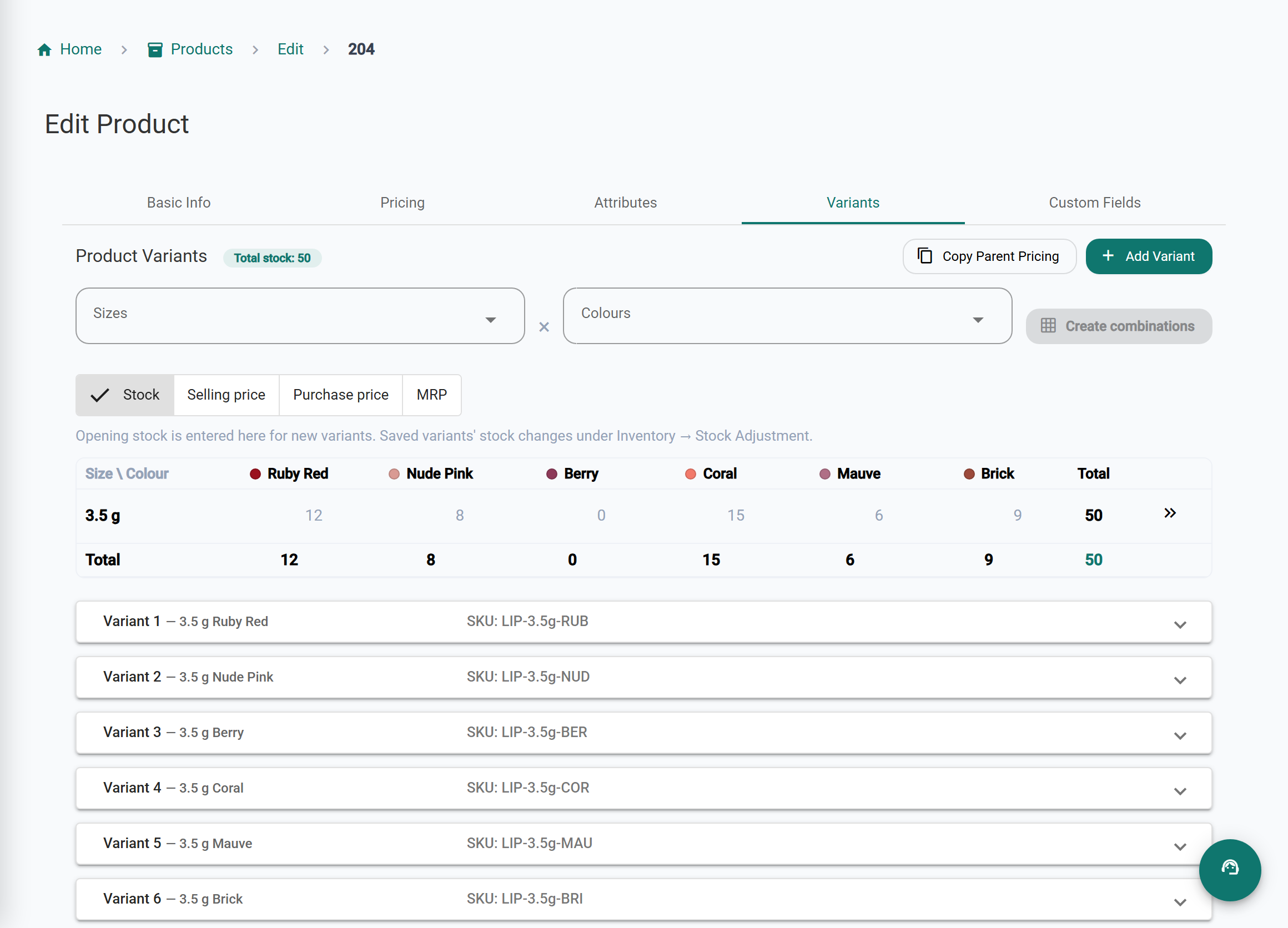
Every shade and every lot in view
Shades without confusion
Each shade is a variant with its own swatch, barcode and stock.
Less expired stock
Sales take the lot that expires first, and the expiry report shows what to clear.
Answers at the counter
Skin type, hair type, scent and SPF on the product.
Regulars come back
Loyalty points and offers that apply on their own.
BillSakha vs a register
| Task | Register or spreadsheet | BillSakha |
|---|---|---|
| Stock of one lipstick in 12 shades | Twelve lines to count by hand | One product, 12 variants with their own stock |
| Expiry dates | Checked shelf by shelf | Expiry report and expiry-first selling |
| Buy 2 get 1 free | Worked out at the counter | The offer applies on the bill by itself |
| Regular customers | A punch card, if any | Loyalty points they earn and redeem |
Is BillSakha right for your store?
Best for
- Cosmetics and beauty stores with many shades and sizes
- Stores that stock items with batch numbers and expiry dates
- Stores that run offers and reward regular customers
Check before you decide
- Some features depend on your plan, so check the plan comparison.
- Salon appointments are not built yet (see "Not built yet").
How to add a lipstick in all its shades in BillSakha
- Add your shades once under Products → Colors.
- In Products → Add Product, set the product type to Variable (with variants) and open the Variants tab.
- Pick the shades and click Create combinations: each shade gets its own SKU and barcode.
- Fill in the stock and selling price for each shade in the grid, and save.
How-to guides
Step-by-step help for the things this kind of shop does every day.
- Give a discountA discount at the counter, discount codes, and offers that apply on their own.
- Sizes and colours (variants)Create every size in every colour at once, each with its own barcode, price and stock.
- Batches and expiry datesRecord lots with batch numbers and expiry dates, and see what is about to expire.
- New GST rates 2025: what changes on your billsThe 12% and 28% GST slabs are gone. What the new 5%, 18% and 40% rates mean for a shop, old stock, bills across the change date, and your billing software.
Common questions
Can each lipstick shade have its own stock?
Yes. Make the shades variants of one product; each has its own stock, barcode and colour swatch.
Will it warn me about expiring stock?
Record batches with expiry dates and the expiry report lists lots close to or past their date.
Can I sell a gift hamper at one price?
Yes. Set it up as a kit under Products → Bundles with its items and one price; each item comes out of stock when you sell it. Shades with variants cannot go in a kit yet.
Can I send the bill on WhatsApp?
Yes. Send it from the bill instead of printing; the customer gets a link to see the bill and download the PDF.
What is the best billing software for a cosmetics shop?
One that keeps stock per shade, tracks batches and expiry, and rewards regular customers. BillSakha does these. Start a free trial and add a few real products before you decide.
Can I try it before paying?
Yes. Start a free trial and bill a few real items before you decide.