Wholesale and distribution billing software
BillSakha is GST billing software for wholesalers and distributors in India. Orders, delivery challans, credit limits, schemes and E-Way Bills for the shops you supply. Read the "not built yet" list before you decide.
Last updated: October 2026
What is wholesale billing software?
Wholesale billing software takes orders from the shops you supply, sends goods against delivery challans, applies retailer rates and schemes, and keeps credit under control. It replaces order books, challan books and credit registers with one record.
Built for orders, credit and schemes
Everything below is in BillSakha now. Features marked not on every plan depend on your plan; the plan comparison shows which.
Sales orders and delivery challans
Take an order, send goods with a challan, and turn the order into an invoice on delivery.
not on every planCredit control
Credit limits and payment terms per customer, payments against invoices, and the aging report of what is overdue.
not on every planSchemes
Schemes that apply on their own: a discount above an order value, or buy 10 get 1 free on a product; or applied with a scheme code on the bill.
Price levels
Retailer, wholesaler or distributor rates: a percent off or a price per product for each level, used automatically for the customers on it.
Cases and pieces
Sell by the case or by the piece from one stock, each at its own price; a case takes its full count out of stock. Order and receive from companies by the case too.
E-Way Bill and e-invoice JSON
Download the E-Way Bill and e-invoice JSON to upload on the government portals.
not on every planPurchases from companies
Purchase orders, goods received, purchase bills and returns.
not on every planNot built yet
Things you may expect that BillSakha does not do today. We would rather you know before you sign up.
Salesman routes and order taking
There are no beat or route plans and no order-taking app for salesmen yet.
IRN and E-Way Bill straight from the app
Today you download the JSON and upload it on the portal yourself.
See it on screen
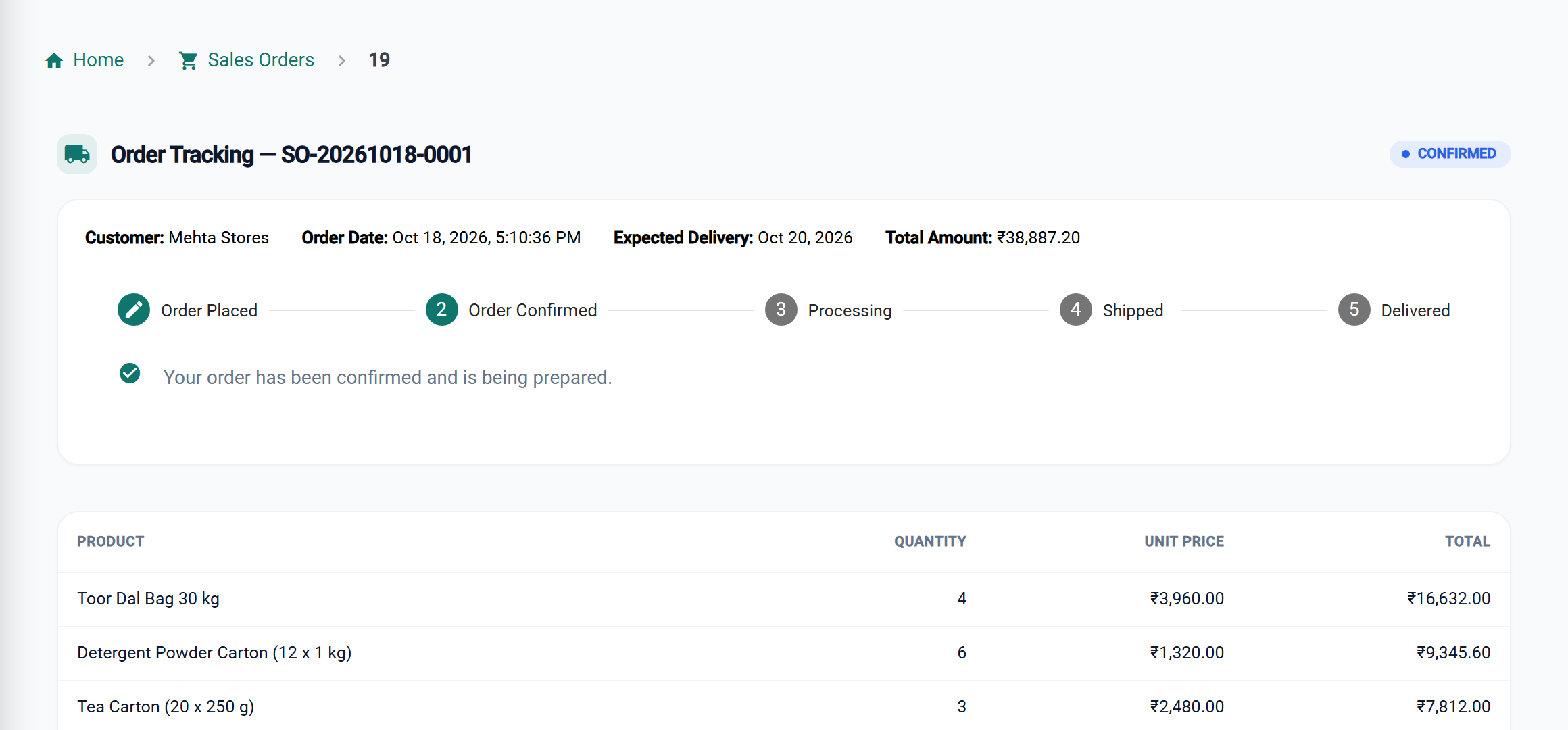
Every order and every rupee owed
Order to invoice
Take the order, send a challan, and turn it into the invoice on delivery.
The right rate every time
Retailer, wholesaler or distributor price levels apply by themselves.
Schemes without arguments
Buy 10 get 1 or a discount above an order value applies on the bill.
Credit under control
Credit limits, payment terms and the aging report.
BillSakha vs order and challan books
| Task | Order book, challan book, register | BillSakha |
|---|---|---|
| Order to delivery to bill | Three books, written three times | Order, challan and invoice from one entry |
| A retailer's rate | Looked up on a rate list | Their price level applies by itself |
| Buy 10 get 1 free | Worked out on every bill | The scheme applies on the bill |
| Who is over their limit | Checked in the register | Credit limits and the aging report |
Is BillSakha right for your business?
Best for
- Wholesalers and distributors supplying retail shops
- Businesses selling by the case and by the piece
- Businesses running schemes and credit for their buyers
Check before you decide
- Orders, challans, credit control, warehouses, purchases and GST/E-Way Bill files depend on your plan, so check the plan comparison.
- Salesman routes and sending IRN or E-Way Bills straight from the app are not built yet (see "Not built yet").
How to give retailers their own rates in BillSakha
- Go to Products → Price Levels and click Add Price Level, for example "Retailer", with a percent off the selling price if you like.
- For products with a fixed rate at this level, open the product, go to Pricing and fill in its price under Price levels.
- Open each retailer (Customers → All Customers → Edit), choose the level under Price level and save.
- Pick the retailer on a bill: the lines switch to their rates by themselves.
How-to guides
Step-by-step help for the things this kind of shop does every day.
- Send a quotation and turn it into a billQuote prices with a valid-until date, print or email it, and convert it to an invoice when the customer agrees.
- Send goods with a delivery challanMake a challan for an invoice with the vehicle and driver, print it, and mark it delivered.
- Sell by the box and by the pieceOne stock, two units: box and piece, bag and kg, strip and tablet.
- Wholesale and contractor price levelsGive groups of customers their own prices, used automatically on their bills.
- Customers who pay later (udhaar)Bill on credit, record part payments, and see what each customer owes.
- A payment that covers several billsA customer pays a lump sum: it clears their oldest bills first.
- Cheque payments and bounced chequesRecord a cheque's details, and undo it if it bounces.
- E-invoice and E-Way BillSave the JSON file, upload it on the government portal, and enter the IRN or EWB number.
- New GST rates 2025: what changes on your billsThe 12% and 28% GST slabs are gone. What the new 5%, 18% and 40% rates mean for a shop, old stock, bills across the change date, and your billing software.
- Tax invoice or bill of supply: which to issue?When a shop issues a GST tax invoice, when a bill of supply, and when no bill is needed at all, with what each must show. Straight from the CGST Act and Rules.
Common questions
Can I see which shops are over their credit limit?
Credit limits are set per customer and overdue amounts show in the aging report. Credit control is not included in every plan.
Can I give some retailers a special rate?
Yes. Make a price level for them and put them on it; their bills use its prices. Price levels are on every plan.
Can I send goods with a delivery challan?
Yes. Make a challan for the invoice with the vehicle and driver, print it, and mark it delivered when the goods arrive. Sales orders and delivery challans are not included in every plan.
Can I take an order without internet?
Yes. A new sales order made while the connection is down is saved on the device and sent when it is back, once only. Customer and product search use the copy on the device when Billing without internet is on.
What is the best billing software for a distributor?
One that takes orders, sends challans, applies retailer rates and schemes, and keeps credit under control. BillSakha does these; check the "not built yet" list before you decide. Start a free trial and bill a few real orders.
Can I try it before paying?
Yes. Start a free trial and bill a few real items before you decide.