Electronics and mobile shop billing software
BillSakha is GST billing software for electronics and mobile shops in India. Every phone sold by its IMEI, model and warranty on every product, quotations for bigger purchases, part payments, and repairs and warranty claims on job cards.
Last updated: October 2026
What is mobile shop billing software?
Mobile shop billing software creates GST bills that name the IMEI or serial number of each unit sold, keeps stock per model and colour, and tracks repairs and warranty claims. It replaces IMEI notebooks and repair slips with one record.
Built for IMEIs, repairs and warranty
Everything below is in BillSakha now. Features marked not on every plan depend on your plan; the plan comparison shows which.
IMEI and serial numbers
Scan the IMEIs in on the goods receipt as stock arrives; every bill names the IMEI of each phone it sells, a return or exchange takes it back by IMEI, and a search shows when and to whom a unit was sold.
Specifications on the product
Model, warranty, processor, memory, display, battery, connectivity and power details, so staff can answer questions.
Colour variants
Each colour can be a variant with its own SKU, barcode and stock.
Quotations
Quote a TV or a laptop, and turn the quotation into an invoice when the customer agrees, picking the IMEIs then.
Returns and exchanges
Take back or swap an item against the original bill, with a credit note for any refund.
Repair job cards
Take a device in with its IMEI, problem, accessories, estimate and any advance; track it to ready, print a slip, message the customer on WhatsApp, and bill parts and labour in one go, with the advance already paid on the bill.
Warranty claims
Scan the IMEI of a unit brought back: the job card shows the bill and date it was sold on and whether the product's warranty still covers it, and Warranty claims on Job Cards lists every claim.
Part payments
Record an advance now and the balance later; the bill shows what is still due.
Bills on WhatsApp
Send the bill to the customer on WhatsApp instead of printing it.
See it on screen
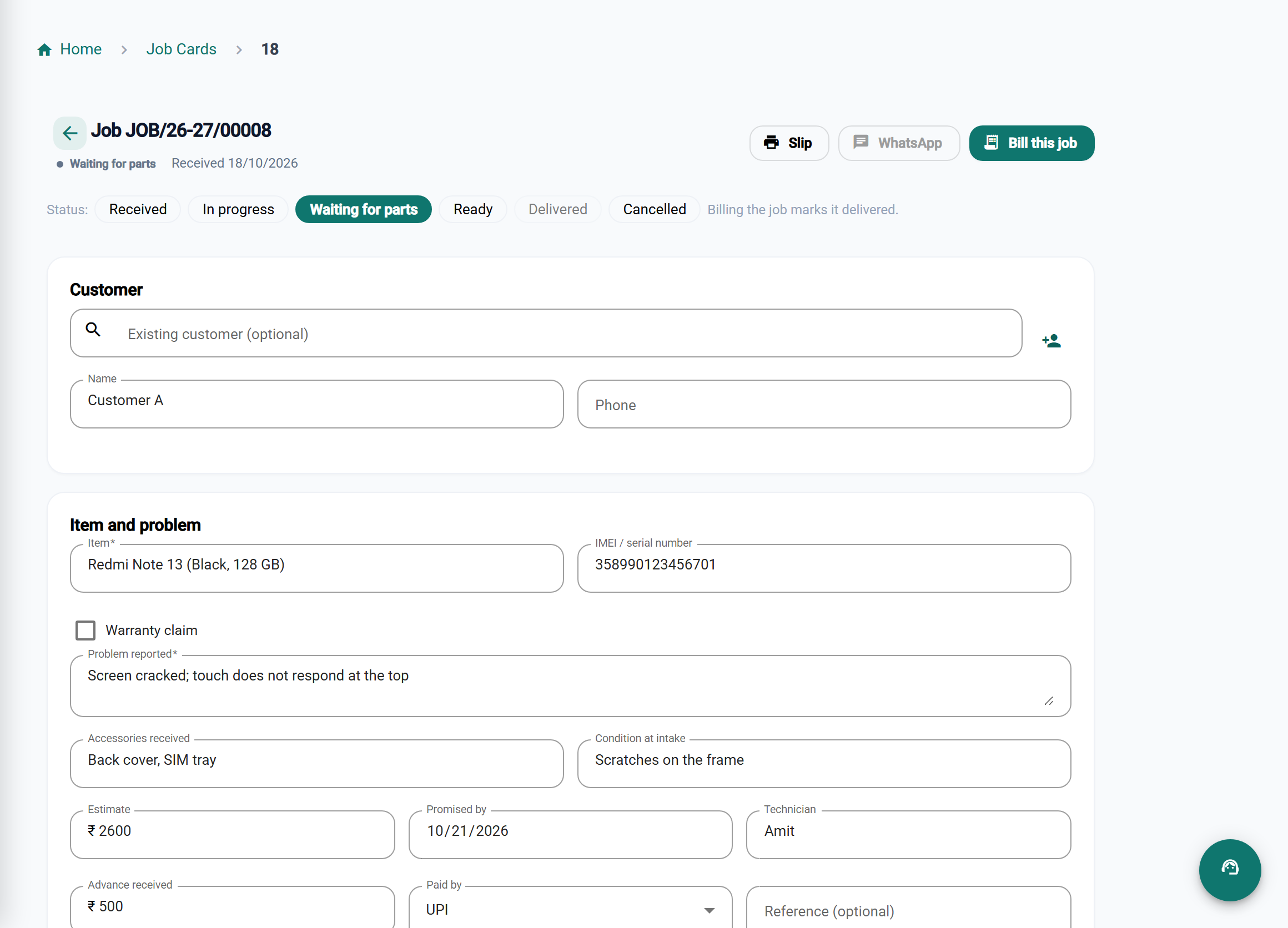
Every unit traceable
IMEI on every bill
Know when and to whom each phone was sold, and take it back by IMEI.
Warranty in seconds
Scan a unit brought back and see its sale date and whether it is still covered.
Repairs under control
Job cards from intake to ready, with the advance already on the final bill.
Bigger sales closed
Quotations become invoices, and part payments show what is still due.
BillSakha vs notebooks
| Task | IMEI notebook and repair slips | BillSakha |
|---|---|---|
| Which customer bought this phone | Search pages of IMEI entries | Search the IMEI and see the bill |
| Is it still under warranty | Find the bill, count the months | The job card shows the sale and the cover |
| A phone in for repair | A paper slip and a phone call | Job card, slip and WhatsApp message |
| Advance taken on a repair | Remembered at billing time | Already marked paid on the final bill |
Is BillSakha right for your shop?
Best for
- Mobile and electronics shops selling units with IMEI or serial numbers
- Shops that also repair devices
- Shops selling on part payment
Check before you decide
- Some features, such as staff commission, depend on your plan, so check the plan comparison.
How to sell phones by IMEI in BillSakha
- Turn on serial tracking for the product.
- Scan the IMEIs in on the goods receipt as stock arrives, or under Products → Serial Numbers for phones already on the shelf.
- Scan an IMEI in Quick Bill to add that exact phone to the bill.
- The bill names the IMEI, and a return or warranty claim finds it by the same number.
How-to guides
Step-by-step help for the things this kind of shop does every day.
- Repairs with job cardsTake a device in with an advance, track the repair, and bill parts and labour from the job.
- IMEI and serial numbersSell each phone or appliance by its IMEI or serial, and find who bought it.
- GST on mobiles, TVs and electronics in 2026GST on mobile phones, accessories, TVs, ACs, laptops and batteries since 22 September 2025, what changed from 28% to 18%, and billing phones by IMEI.
- New GST rates 2025: what changes on your billsThe 12% and 28% GST slabs are gone. What the new 5%, 18% and 40% rates mean for a shop, old stock, bills across the change date, and your billing software.
Common questions
Can I record the IMEI of each phone I sell?
Yes. Turn on serial tracking for the product and scan the IMEIs in on the goods receipt (or under Products → Serial Numbers for phones already on the shelf). Each bill then names the IMEI of every phone sold, and scanning an IMEI in Quick Bill adds that phone.
Can customers pay in parts?
Yes. Record each payment against the invoice; the balance due is shown until it is fully paid.
Can I track repairs?
Yes. Take each device in on a job card, move it through in progress, waiting for parts and ready, and bill the parts and labour from it. Job cards are on every plan.
Can I keep a register of warranty claims?
Yes. Take the unit in on a job card and enter its IMEI: the card shows the sale and whether it is still covered (from the product's Warranty, such as 1 year), and Warranty claim is ticked for you. The Warranty claims filter on Job Cards is the register. Job cards are on every plan.
Can I take an advance when a repair comes in?
Yes. Enter it on the job card with how it was paid. When you bill the job, the advance is recorded as paid on the bill, so the customer pays only the rest.
What is the best billing software for a mobile shop?
One that records the IMEI on every bill, checks warranty in seconds, and tracks repairs. BillSakha does these. Start a free trial and bill a few real units before you decide.
Can I try it before paying?
Yes. Start a free trial and bill a few real items before you decide.