Supermarket and general store billing software
BillSakha is GST billing software for supermarkets and general stores in India. Several counters billing at once, thousands of items by barcode, loose items by weight, offers like buy 2 get 1, and expiry dates under control.
Last updated: October 2026
What is supermarket billing software?
Supermarket billing software lets several cashiers bill at the same time from one shared stock, scans barcodes, applies offers on its own and keeps track of what is running low or close to expiry. It replaces separate cash registers and stock registers with one record.
Built for busy counters and full shelves
Everything below is in BillSakha now. Features marked not on every plan depend on your plan; the plan comparison shows which.
Several counters
Each cashier logs in with their own account and bills from Quick Bill; you see every counter's sales together. The number of users depends on the plan.
not on every planBarcode billing
Scan packed goods, use keyboard shortcuts, and hold a bill while a customer fetches one more item.
Loose items by weight
Fruit, vegetables, grains and spices sell by the kg or g with decimal quantities. Scan the label your weighing scale prints and the item comes in with its weight.
By the case or by the piece
Sell a whole case at the case price or single pieces from the same stock; the bill line switches between case and piece. Order and receive by the case too.
Offers and discount codes
Offers that apply on their own, such as 10% off above ₹2,000 or buy 2 get 1 free on a product: the bill takes the best one it qualifies for and tells the cashier how much more reaches the next. Discount codes too.
Batches and expiry dates
Batch number and expiry date per lot; sales take the lot that expires first, and the expiry report shows what to clear.
Low-stock alerts
A minimum level per product, and an alert before the shelf runs empty.
Loyalty points
Regular customers earn and redeem points.
Suppliers and purchases
Purchase orders, goods received and purchase bills, all updating stock.
not on every planSee it on screen
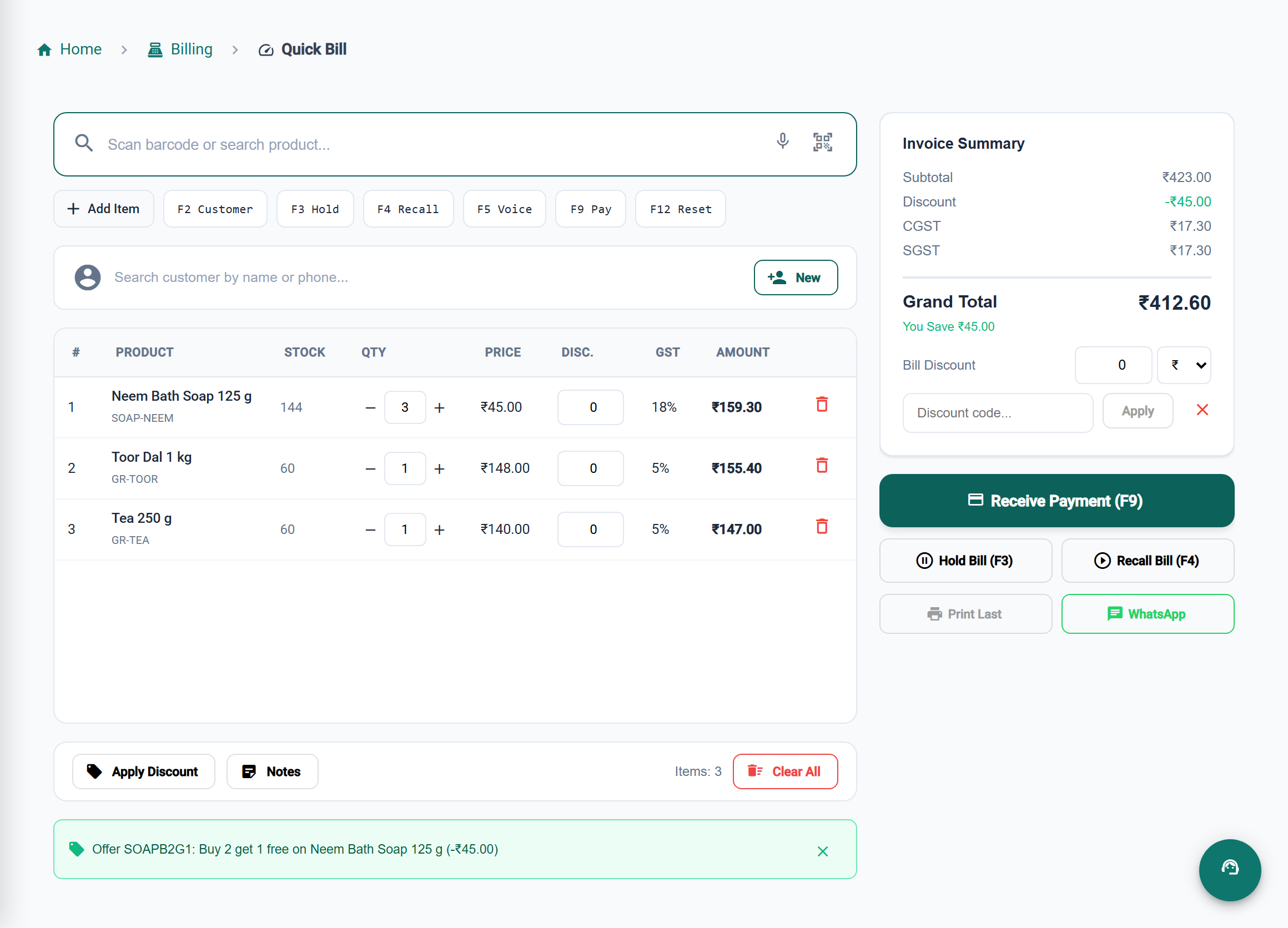
One stock behind every counter
Counters share one stock
Every cashier bills from the same stock, so a sale at one counter shows everywhere at once.
Offers without arguments
Offers apply on their own and the bill takes the best one, so cashiers do not have to remember them.
Less expired stock
Sales take the lot that expires first, and the expiry report shows what to clear.
Fewer empty shelves
Low-stock alerts warn you before a fast-moving item runs out.
BillSakha vs separate registers
| Task | Cash register and stock book | BillSakha |
|---|---|---|
| Three counters billing at once | Each counter totals up separately at night | Every counter's sales together, as they happen |
| Buy 2 get 1 free | The cashier has to remember and work it out | The bill applies the offer by itself |
| Vegetables by weight | Weigh, work out the price, write it down | Enter or scan the weight; price and stock follow |
| Expiring stock | Found when a customer complains | Expiry report and expiry-first selling |
Is BillSakha right for your store?
Best for
- Supermarkets and general stores with more than one billing counter
- Stores that run offers and discount codes
- Stores selling packed goods by barcode and fresh items by weight
- Owners who want every counter's sales and stock in one place
Check before you decide
- The number of cashier logins depends on your plan, so check the plan comparison.
- Suppliers and purchases are not included in every plan.
How to set up an offer that applies on its own in BillSakha
- Go to Sales → Discounts and add a discount: a percentage, a fixed amount, or buy X get Y on a product.
- For an amount off, set the minimum bill amount (for example 10% off above ₹2,000). For buy X get Y, choose the product, how many to buy and how many to get.
- Turn on Apply automatically and save.
- Bill as usual in Quick Bill: each bill takes the best offer it qualifies for and shows the saving.
How-to guides
Step-by-step help for the things this kind of shop does every day.
- Bill a customer with Quick BillScan or search items, change quantities, take payment, and the keyboard shortcuts.
- Hold a bill and come back to itPark a bill while a customer fetches something, and serve the next customer meanwhile.
- Give a discountA discount at the counter, discount codes, and offers that apply on their own.
- Bill when the internet dropsKeep products, customers and bill numbers on each device, see what is waiting to send, and check offline bills.
- Weighing-scale labelsScan the labels your weighing scale prints, with the weight or price inside the barcode.
- Add stock and get low-stock alertsStock Entry, minimum levels, and the Low Stock Alerts page.
- Print barcode labelsGenerate barcodes and print labels on A4 sheets or label rolls.
- More than one branchAdd branches, switch between them, and move stock from one to another.
- GST rates on kirana items: the 2026 listGST on everyday kirana items since 22 September 2025: milk and dairy, biscuits, namkeen, drinks, soap and shampoo, with the old and new rates side by side.
- New GST rates 2025: what changes on your billsThe 12% and 28% GST slabs are gone. What the new 5%, 18% and 40% rates mean for a shop, old stock, bills across the change date, and your billing software.
Common questions
Can three counters bill at the same time?
Yes. Each cashier uses their own login on their own computer or tablet; stock and sales are shared. How many users you can add depends on the plan.
Do offers apply automatically?
Yes. Tick Apply automatically on the offer, and every bill takes the best one it qualifies for: a percentage or flat amount above a bill value, or buy X get Y on a product (buy 2 get 1 free, or half price). A code the cashier types still wins. Offers are on every plan.
Can I sell vegetables by weight?
Yes. Products in kg or g take decimal quantities like 0.75 kg, and Quick Bill reads the labels your weighing scale prints.
What happens if the internet drops at a counter?
The bill is saved on that device and sent when the connection is back, without being made twice. With Billing without internet turned on, each counter also keeps your products for search and has its own bill numbers, and the owner is told if an offline bill sold more than was in stock.
What is the best billing software for a supermarket?
One that lets several counters bill from one stock, applies offers on its own, and keeps expiry dates and low stock in view. BillSakha does these. Start a free trial and bill a few real items at your counter before you decide.
Can I try it before paying?
Yes. Start a free trial and bill a few real items before you decide.