What is POS billing software?
POS (point of sale) billing software is the screen used at the counter to make a bill quickly: items are scanned or searched, the total and GST are worked out, payment is taken by cash, UPI or card, and the bill is printed or sent. It replaces the cash register and handwritten bills, and each sale updates stock as it is made.
How the counter works in BillSakha
- 1
Scan or search
Scan a barcode, or type part of a name, SKU or barcode and pick the item. Change the quantity with + and −; loose items take decimals like 0.5 kg.
- 2
Take payment
Press F9, choose Cash, UPI or Card, or split one bill across more than one of them, and finish.
- 3
Print or send
Print on an 80 or 58 mm receipt printer or on A4, or send the bill to the customer on WhatsApp.
See it in the app
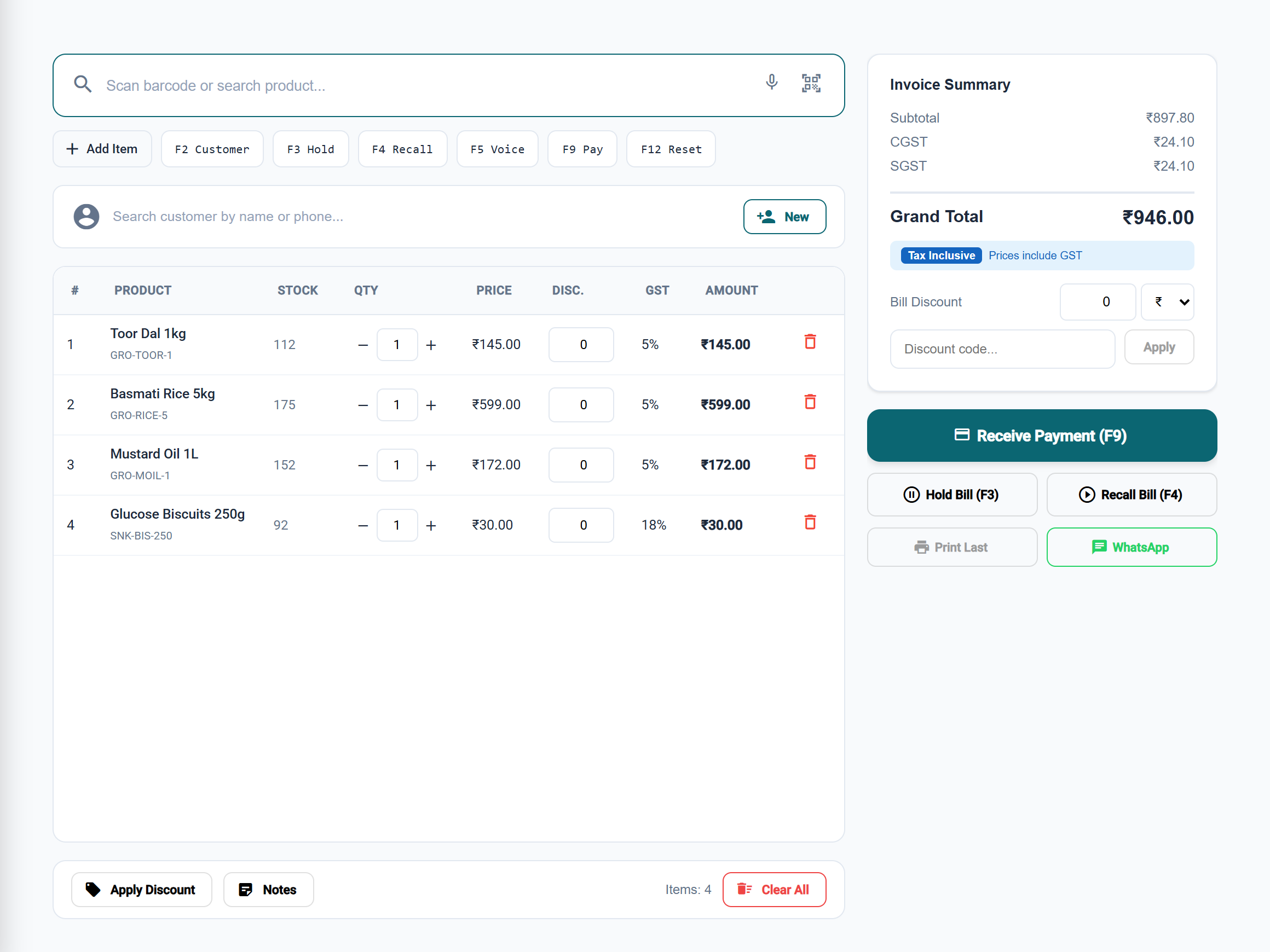
Made for a busy counter
Hold and recall
A customer forgot something? Press F3 to park the bill and serve the next person; F4 brings it back.
Keyboard first
F2 picks the customer, F3 holds, F4 recalls, F9 takes payment and F12 starts a new bill.
Discounts and offers
A bill discount in ₹ or %, discount codes, and offers that apply on their own, including buy X get Y.
Kits and sizes
Sell a kit at one price, every size and colour from its own barcode, and items from weighing-scale labels.
A login for each cashier
Each person signs in as themselves, and their role decides what they can see and do.
When the internet drops
A bill made while offline is saved on the device and sent when the connection is back. With Billing without internet on, search and bill numbers work offline too.
What you need
- A computer, tablet or phoneAny device with a web browser. Nothing to install; add it to the home screen to open it like an app.
- A printerAn 80 or 58 mm receipt printer the device can print to, or any A4 printer. Or no printer: send bills on WhatsApp.
- A barcode scanner, if you likeAny USB or Bluetooth scanner that types like a keyboard, or the device's camera for a few items.
There is no cash drawer control or end-of-day cash count screen yet.
Step-by-step guides
Questions
Does it work on a tablet or a phone?
Yes. Quick Bill opens in the web browser on a computer, tablet or phone, and the same shop is on every device.
Which receipt printers does it work with?
Bills have 80 mm and 58 mm receipt templates and an A4 template. Any receipt printer your computer or tablet can print to will do.
Can a customer pay part in cash and part by UPI?
Yes. In the payment window, add another payment mode and split the amount between them.
What happens if the internet goes while I am billing?
The bill is saved on the device and sent when the connection is back, without being made twice. With Billing without internet turned on, the device also keeps your products and customers for search and has its own bill numbers.
Is Quick Bill in every BillSakha plan?
Yes, Quick Bill is in every plan and in the free trial.