What is footwear shop billing software?
Footwear shop billing software creates GST bills and keeps stock for every size and colour of each model, so you can see at a glance which sizes are left and which to reorder. It also prints box labels and handles size exchanges.
Built for every size of every model
Everything below is in BillSakha now. Features marked not on every plan depend on your plan; the plan comparison shows which.
Sizes and colours
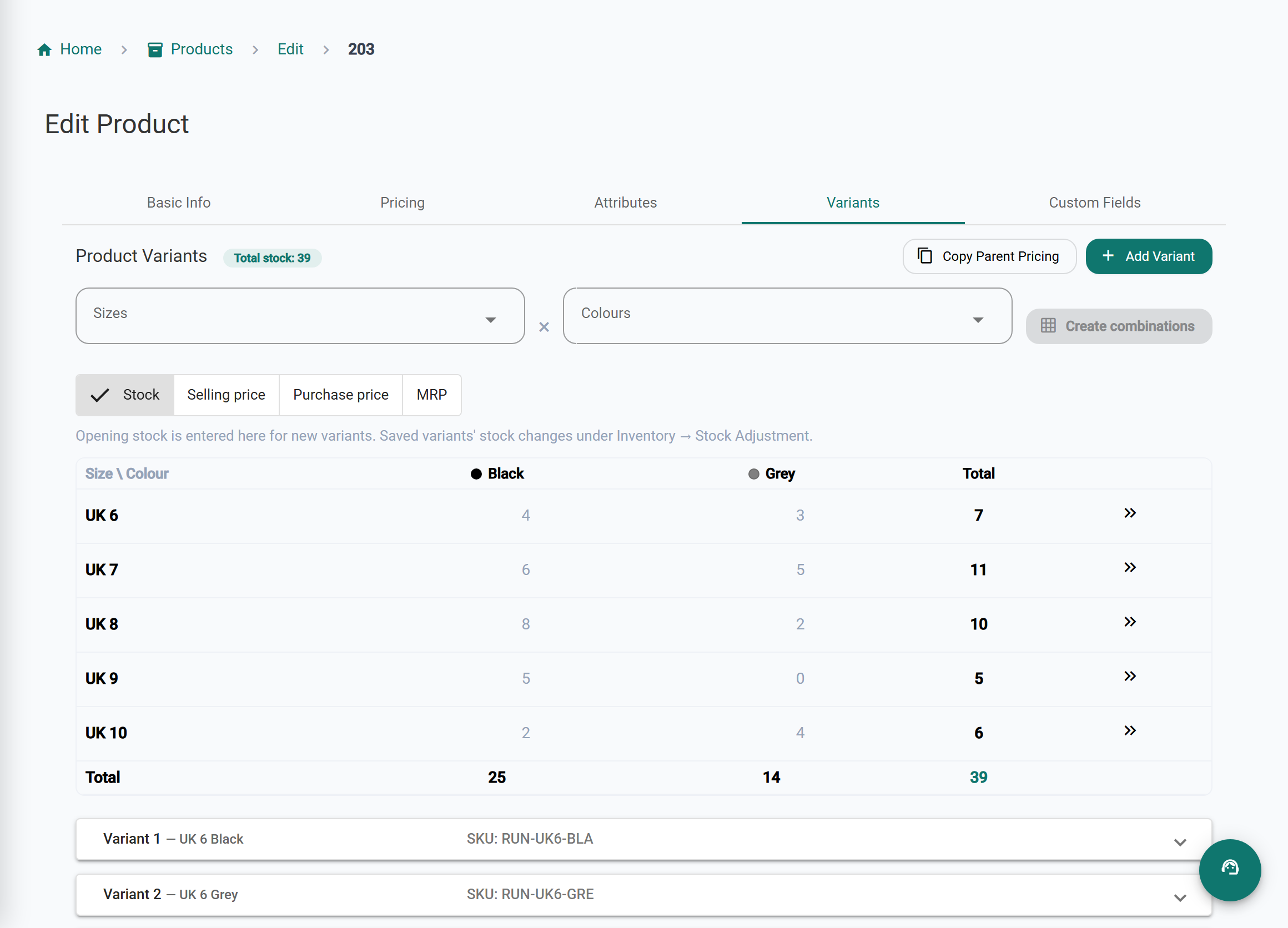
One model, many variants: each size and colour has its own SKU, barcode, price and stock. Create a whole range in one go from a size-by-colour grid, and fill stock and prices across it.
Barcodes and box labels
Generate barcodes and print labels on A4 sheets or label rolls to stick on boxes.
Size exchanges
Swap a pair for another size against the original bill; the returned pair goes back into stock.
Discounts and season sales
Discount on a line or the whole bill at the counter; discount rules and codes for a sale season.
Low-stock alerts
Set a minimum level per variant and get told before a popular size runs out.
More than one branch
Stock per branch and transfers between them. The number of branches depends on the plan.
not on every planLoyalty points
Reward repeat customers with points.
Bills on WhatsApp
Send the bill to the customer on WhatsApp instead of printing it.
Not built yet
Things you may expect that BillSakha does not do today. We would rather you know before you sign up.
GST rate that follows the selling price
For footwear, the GST rate depends on the price of the pair. The app uses the rate you set on each product and does not switch it automatically by price, so set it per model.
See it on screen
The right size on the shelf
Sizes you can see
Stock for each size and colour, and the total for the model.
Reorder in time
Low-stock alerts per variant, before a popular size runs out.
Easy size swaps
Exchange a pair against the original bill; the returned pair goes back into stock.
Whole ranges in one go
Create every size and colour of a model at once from a grid.
BillSakha vs a stock book
| Task | Stock book | BillSakha |
|---|---|---|
| Which sizes are left of a model | Check the shelf or the book | Stock per size and colour on the product |
| A customer swaps size 8 for 9 | Two corrections by hand | Exchange against the bill; stock updates |
| Box labels | Written by hand | Barcode labels on sheets or rolls |
| Popular size running out | Noticed when it is gone | An alert when it drops below your minimum |
Is BillSakha right for your shop?
Best for
- Footwear shops with many sizes and colours per model
- Shops that do size exchanges every day
- Owners who want to reorder before sizes run out
- Shops with more than one branch (the number of branches depends on the plan)
Check before you decide
- Some features depend on your plan, so check the plan comparison.
- The GST rate does not switch automatically with the selling price yet (see "Not built yet").
How to add a model in every size in BillSakha
- Create the model once, with its price and GST rate.
- Open its Variants tab and pick the sizes and colours.
- Create every combination at once, then fill stock and prices in the grid.
- Print barcode labels for the boxes.
How-to guides
Step-by-step help for the things this kind of shop does every day.
- Take a return or exchangeReturn items against the original bill, put them back in stock and record the refund.
- Sizes and colours (variants)Create every size in every colour at once, each with its own barcode, price and stock.
- Print barcode labelsGenerate barcodes and print labels on A4 sheets or label rolls.
- GST on clothes and footwear: the ₹2,500 ruleGST on garments, made-ups and footwear since 22 September 2025: 5% up to ₹2,500 a piece or pair, 18% above it, with worked examples for a shop counter.
- New GST rates 2025: what changes on your billsThe 12% and 28% GST slabs are gone. What the new 5%, 18% and 40% rates mean for a shop, old stock, bills across the change date, and your billing software.
Common questions
Does each size have its own barcode?
Yes. Every size and colour is a variant with its own SKU and barcode.
Can I see which sizes are left of a model?
Yes, the product shows stock for each variant, and the total.
Do I have to add every size one by one?
No. On the product's Variants tab, pick the sizes and colours and create every combination at once, then enter stock and prices in the size-by-colour grid.
What GST rate applies to footwear?
Since 22 September 2025, footwear selling at up to ₹2,500 a pair is taxed at 5%, and above ₹2,500 a pair at 18%. Set the rate on each model by its selling price. For a particular item, check its HSN code or ask your CA.
What is the best billing software for a footwear shop?
One that keeps stock for every size and colour, prints box labels and handles size exchanges. BillSakha does these. Start a free trial and add a few real models before you decide.
Can I try it before paying?
Yes. Start a free trial and bill a few real items before you decide.