Pharmacy and medical store billing software
BillSakha is GST billing software for pharmacies and medical stores in India. Batch numbers, expiry dates and MRP on every product, with sales taken from the batch that expires first. Read the "not built yet" list before you decide: some things a pharmacy needs are not there yet.
Last updated: October 2026
What is pharmacy billing software?
Pharmacy billing software creates GST bills with MRP, tracks every batch and expiry date, and sells from the batch that expires first. The useful ones also sell strips and loose tablets from one stock and print the drug licence number on the bill.
Built for batches, expiry and strips
Everything below is in BillSakha now. Features marked not on every plan depend on your plan; the plan comparison shows which.
Batch and expiry on every purchase
Record the batch number and expiry date as stock comes in. Sales take the batch that expires first, or you pick the batch on the bill.
Expiry report
See which batches are close to their expiry date or already past it, so you can return or clear them in time.
MRP, GST and drug licence
MRP, HSN code and GST rate on every product, with the tax split shown on the bill, and your drug licence number printed beside the GSTIN.
Strips and loose tablets
Keep a medicine in tablets with a strip of 10 as its pack: sell a whole strip at the strip price or a few tablets, from one stock. Order and receive it by the strip too.
Low-stock alerts
A minimum level per medicine, and an alert when stock drops below it.
Returns to the supplier
Purchase bills from your distributors and returns of expired or damaged stock, all updating stock.
not on every planCustomer accounts
Regular customers can pay later; their ledger shows what they owe.
Doctor and prescription on the bill
Add your own invoice fields, such as the doctor's name and the prescription number. They are filled in on a new invoice and printed on the bill (not in Quick Bill yet).
not on every planNot built yet
Things you may expect that BillSakha does not do today. We would rather you know before you sign up.
Schedule H, H1 and X register
There is no register of scheduled-drug sales yet. If you sell scheduled drugs you still need to keep that register separately.
See it on screen
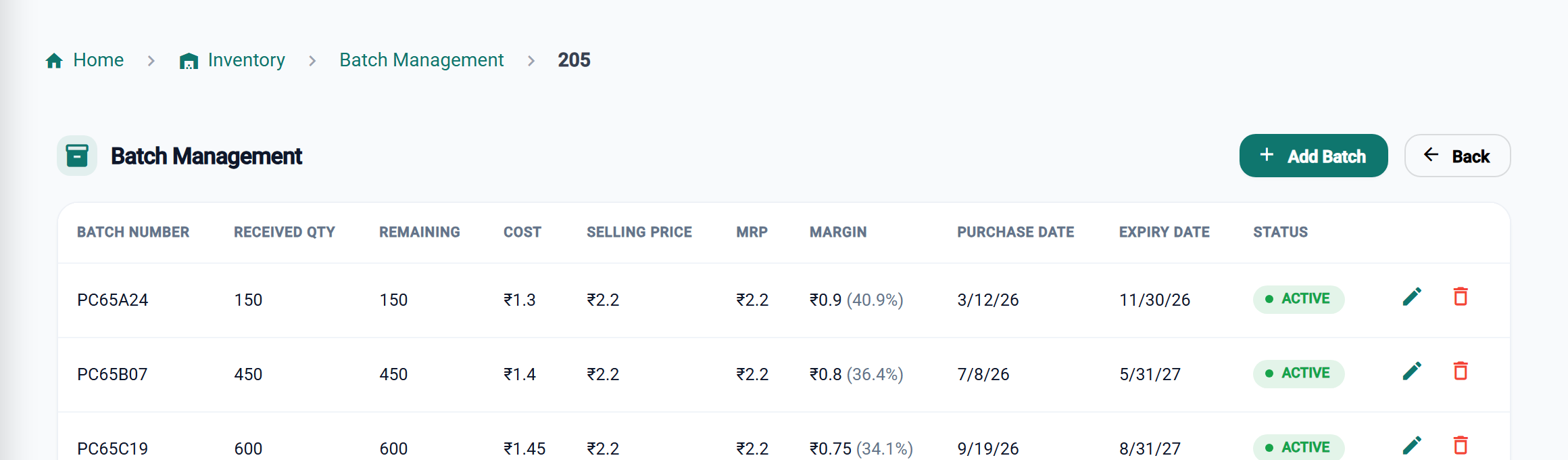
Batches and expiry under control
Expiry-first selling
Sales take the batch that expires first, unless you pick one on the bill.
Returns in time
The expiry report shows batches close to or past their date.
Strips and tablets, one stock
Sell a strip or a few tablets; stock stays right either way.
Licence on every bill
Your drug licence number prints beside the GSTIN.
BillSakha vs a purchase register
| Task | Purchase register | BillSakha |
|---|---|---|
| Which batch to sell first | Read every box | Sales take the batch that expires first |
| Stock close to expiry | Checked shelf by shelf | Expiry report |
| Selling 4 tablets from a strip | Stock count goes wrong | Tablets and strips from one stock |
| Medicine running low | Noticed when it is gone | An alert below your minimum |
Is BillSakha right for your store?
Best for
- Medical stores that want batch and expiry tracking with GST billing
- Stores selling strips and loose tablets
- Stores with regular customers who pay later
Check before you decide
- There is no Schedule H, H1 and X register yet (see "Not built yet").
- Supplier returns and your own invoice fields depend on your plan, so check the plan comparison.
How to print your drug licence number on bills in BillSakha
- Go to Settings → Company Profile → Legal Registration.
- Enter your drug licence number (and FSSAI number if you sell food items).
- It prints beside the GSTIN on every bill and PDF.
How-to guides
Step-by-step help for the things this kind of shop does every day.
- Sell by the box and by the pieceOne stock, two units: box and piece, bag and kg, strip and tablet.
- Batches and expiry datesRecord lots with batch numbers and expiry dates, and see what is about to expire.
- Add stock and get low-stock alertsStock Entry, minimum levels, and the Low Stock Alerts page.
- Your own fields (custom fields)Add fields of your own to products, customers and invoices: measurements, doctor, other part numbers.
- Tax invoice or bill of supply: which to issue?When a shop issues a GST tax invoice, when a bill of supply, and when no bill is needed at all, with what each must show. Straight from the CGST Act and Rules.
Common questions
Is it ready for a pharmacy today?
For billing, batches, expiry and GST, yes. The doctor's name and prescription number can go on the bill as your own invoice fields (not on every plan). The scheduled-drug register is not built yet; see the list above.
Which batch does a sale use?
The one that expires first, unless you choose a batch on the bill.
Can my drug licence number appear on bills?
Yes. Enter it under Settings → Company Profile → Legal Registration, and it prints beside the GSTIN on every bill and PDF. Food businesses can add their FSSAI number there too.
What is the best billing software for a medical store?
One that tracks batches and expiry, sells from the batch that expires first, and handles strips and loose tablets. BillSakha does these today; check the "not built yet" list before you decide. Start a free trial and bill a few real items.
Can I try it before paying?
Yes. Start a free trial and bill a few real items before you decide.